Showing posts with label nodeset. Show all posts


I am pleased to announce that NodeSet Pro has been tested on Blender 3.3 LTS and is available from my BlenderMarket store.

NodeSet Pro is an add-on that greatly simplifies the process of importing sets of textures to create a node based material.

It allows you import a set of related texture maps by simply pointing to one of them, takes care of setting the color data attribute correctly, adds bump nodes and normal map nodes where needed and wires up everything to the principled shader or a shader node group you have defined, all with a few simple clicks.

Instead of importing textures like basecolor, normalmap, roughness, etc. one by one, with NodeSet Pro you will only need to select a single texture and textures with the same base name will be loaded as well. NodeSet Pro will also apply non-color data options to texture maps that need this, create normal map and bump nodes and wire everything up to a shader.

Besides individual texture sets NodeSet Pro also offers panels that let you manage collections of textures sets in a straight forward manner.

NodeSet Pro works out of the box with substance painter textures but every aspect of it can be configured in the preferences to seamlessly adapt to your workflow and these preferences can be saved as presets.

NodeSet Pro ported to Blender 2.80


NodeSet Pro has now been ported to Blender 2.80 and is available from BlenderMarket.
Porting this add-on has been fairly easy but be aware that Blender 2.80 is still in beta so you might encounter difficulties!

Blender add-on: TextureWatch

I am happy to announce that yesterday I published my new TextureWatch add-on on Blendermarket.

As illustrated in the video, TextureWatch is a small add-on to automatically synchronize textures used in your .blend file if they change on disk. This simplifies working with external programs like Gimp or Substance Painter because TextureWatch can automatically update those textures when you save your files without the need to go through all images inside Blender one by one and selecting reload. This saves time as well as guarantees consistency.


If you find this useful you might want to take a look at my BlenderMarket store.

NodeSet Pro: 2018 Spring Edition

A month ago I introduced the NodeSet Pro add-on on BlenderMarket, an add-on that allows you to quickly create complete node setups from texture sets. In the new Spring 2018 edition I have added significant enhancements, like the options to manipulate collections of textures sets, saving and loading of preference presets and some smaller features like a color ramp node to control the roughness and options to specify your preferred projection mode (when for example you want to work with blended box mapping instead of UV-mapped meshes).

The new features are highlighted in this short video:

The most visible addition is a panel in the tool region that lets you manage collections of textures sets:

If you have additional suggestions to enhance the usability even more, don't hesitate to contact me.

NodeSet Pro available on BlenderMarket

I am pleased to announce that NodeSet Pro is available from my BlenderMarket store.

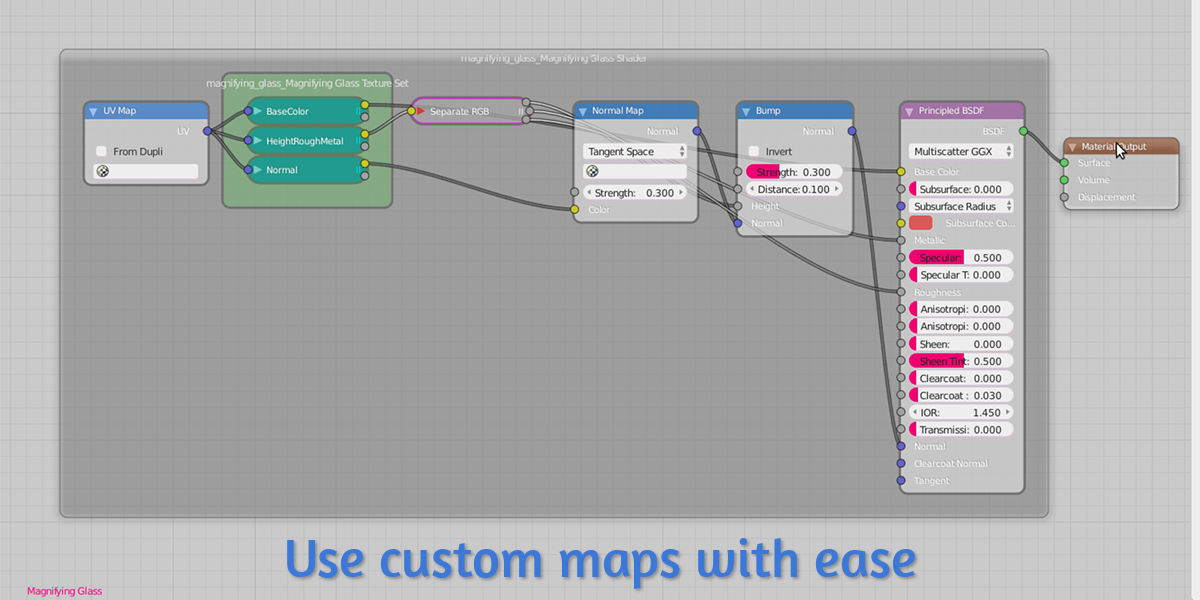
NodeSet Pro is based on my original free NodeSet add-on published in 2017 but was completely rewritten to ease maintenance. The configuration options and functionality where also greatly enhanced, notably with possibilities to work with custom, packed maps, connect to arbitrary nodegroups instead of just the principled shader, add UVMap nodes and Flip Normal nodes and more. Basically you should be able to configure it to your specific workflow needs, regardless what texturing software you are using.

NodeSet Pro will reduce material creation to a few simple clicks while still allowing you to fully tweak the resulting material. Out of the box it will work with texture sets created with Substance Painter's Metallic/Roughness work flow and its Specular/Gloss workflow but almost every node generation feature can be tweaked to fit your specific workflow and texturing software.

Instead of importing textures like basecolor, normalmap, roughness, etc. one by one, with NodeSet Pro you will only need to select a single texture and textures with the same base name will be loaded as well. NodeSet Pro will also apply non-color data options to texture maps that need this, create normal map and bump nodes and wire everything up to a shader.

This shader can be Blender's principled shader

or any other shader node group.

You can even connect any height map automatically to the micro displacement socket.

You can use custom maps that for example pack different maps like height, roughness and metallic into the channels of a single color map

I you want to know more, watch the video or check out my BlenderMarket store.

Nodeset: better heightmap adjustment

NodeSet is now also available in a Pro version. Read all about it in this article or check out my BlenderMarket shop if you are interested.

A new version of Nodeset is available that adds a subtract node if you use the option to link a heightmap to the displacement output.
The reason is that most often the values in a heightmap are between 0 and 1, which will result in a bloated mesh unless you subtract 0.5 first.

Availability

The current version (201801031529) is available for download (right click and save as ...) from my GitHub repository.

Previous nodeset articles

I wrote several articles on this tiny add-on that you might want to read. They are (newest first):

Nodeset: tiny enhancement

NodeSet is now also available in a Pro version. Read all about it in this article or check out my BlenderMarket shop if you are interested.

A new version of nodeset is available that includes .jpg in the default list of extensions.

Availability

The current version (201712020811) is available for download (right click and save as ...) from my GitHub repository.

Previous nodeset articles

I wrote several articles on this tiny add-on that you might want to read. They are (newest first):

Nodeset: bugfix and small new feature

NodeSet is now also available in a Pro version. Read all about it in this article or check out my BlenderMarket shop if you are interested.


The nodeset add-on I talked about in a previous article had a small bug: if your texture set was something different than a collection of .png files the extra files that should be loaded automatically were in fact not loaded. This is fixed in the latest version (201707011445)

Code availability

The change is already committed in the GitHub repository. (right click the link to download).

New feature

Because of a bug in Blender a material with a normal map node will show up as all black if you use the experimental adaptive subdivision / micro polygon displacement. If you change the normal maps space from tangent to object this does not happen so I added a user preferences setting to do this automatically.

Nodeset: add a principled shader

NodeSet is now also available in a Pro version. Read all about it in this article or check out my BlenderMarket shop if you are interested.

Even though there are better paid and free PBR nodegroups/shaders available for Blender (for example from Jeffrey Hepburn or Remington Graphics) the new Principled BSDF (a.k.a. Disney shader or PBR shader) will no doubt prove popular with Blenderheads because it is so simple to use and gives decent results.

So I added an option to add this shader along with all the imported texture sets as well as a normal map node, basically giving you a one-click (almost) option to add a PBR material based on a set of textures from your favorite texturing tool. The new functionality is a available from Add -> Texture menu in the Node editor and sits alongside the original Set of images entry:

The resulting node setup (after selecting a set of textures) will look like this:
Note that this will of course only work with the new Blender 2.79 or with a recent daily build. If the Principled BSDF is not available in your version of Blender it will simply be omitted.

Code availability

The latest version of the code (201706251223) is available on GitHub (right click and select save as ... , then in Blender File -> user preferences ... -> Add-ons -> Install from file .... Don't forget to remove the previously installed version first!)

A short video demo:

Previous articles

Previous articles about the Nodeset add-on:
NODESET: IMPORT SUBSTANCE PAINTER TEXTURES INTO BLENDER
NODESET: TINY UPDATE MIGHT SAVE EVEN SOME MORE TIME
NODESET: SUPPORT FOR AMBIENT OCCLUSION MAPS
NODESET: MORE FLEXIBILITY

Nodeset: more flexibility

NodeSet is now also available in a Pro version. Read all about it in this article or check out my BlenderMarket shop if you are interested.

Prompted by a question from Packsod 百草头 I've added the option to disable filtering the list of files. It's still enabled by default and in fact you can now specify a fragment to be used in the filter pattern.

This means that if all your texture sets normally contain an albedo map with _alb in its name, that you not only can configure which files to load but also you can restrict the list of visible files to pick from, to anything you like. This greatly reduces the clutter when selecting a texture collection from a folder that contains many texture sets. (remember that even though you see a limited list from which you only pick one file, other textures with the same name and matching configured suffixes will still be loaded).

This means you can configure any set of suffixes that your favorite texture editing program uses in these settings and save it along with your user preferences, an example is shown below.


I also added the option to make suffix filtering case sensitive or insensitive. This is set to insensitive by default.

Code availability

The latest version of the code (201702051650) is available on GitHub (right click and select save as ... , then in Blender File -> user preferences ... -> Add-ons -> Install from file .... Don't forget to remove the previously installed version first)

Previous articles

Previous articles about the Nodeset add-on:
NODESET: IMPORT SUBSTANCE PAINTER TEXTURES INTO BLENDER
NODESET: TINY UPDATE MIGHT SAVE EVEN SOME MORE TIME
NODESET: SUPPORT FOR AMBIENT OCCLUSION MAPS