Showing posts with label voronoi crackle. Show all posts

Voronoi crackle in Blender 2.80 rc 1

Yeah, voronoi crackle made it Blender 2.80!
It has taken some time, but now there is nothing that prevents us from creating dragon scales ;-) And yes, it works with Eevee as well. (not the micro-displacement however, that's a whole other story)
Crackle along with many other options is now available in the updated Voronoi Texture node:

Extended Voronoi Texture support in Blender

A long time a go I reported on my efforts to get a more versatile Voronoi texture node in Blender but this effort never led to actual inclusion of the code.

But all of a sudden there has been some interest again and now we have extended Voronoi functionality in the Voronoi texture node! And of course Pablo in his unique enthusiastic style did a nice demo of it as well check out the video.

The new functionality is available in the latest build of 2.79 and presumably in the 2.8 branch too. Note that in my original patch I included Voronoi crackle as well, but that is not available in the new node itself. However since Voronoi crackle is simply the difference between the distance to the 2nd closest and the 1st closest point, this popular pattern is super easy to implement now with the following noodle:


Finally an easy way to generate lizard scales :-)


Extending the Voronoi node in Cycles: a progress report

In a previous post I reported on a small project to extend the functionality of the voronoi noise node in Cycles. After some discussion with developers and users, I spent some time on it and the basic code is done.

Basically the Cycles Voronoi texture node will have all the functionality of its Blender Internal counterpart: you can choose different metrics (= ways to define what a distance is) including the manhattan and chebychev metrics and you can choose whether you want to closest neighbor, the 2nd closest (and 3rd, 4th) or the difference between the 2dn and the 1st closest (a.k.a. Voronoi Crackle). A sample is shown below:

The node has the same outputs as before and just has two extra buttons and an extra input socket (E, which controls the exponent of the Minkovski metric):

The node defaults to the old options and produces output that is pixel for pixel identical to the old output (with a distance metric of Distance squared). The downside of all this extra functionality is that it is slightly slower (because it now has to choose between different metrics and has to keep around more data). So currently I am checking if or where it makes sense to optimize the code some more. I don't want to complicate the code too much because that would make both maintaining and reviewing the code harder, so at this point it might be more sensible to let it be and accept a few percent penalty for now.

Voronoi noise with cyclic metrics, an experiment

While working on adding more functionality on voronoi nodes in OSL I was wondering if we could vary the metric in some interesting way. The result of one of those experiments is shown below:

The noodle used to generate this image looks like this:

Note the number 7 in de metric drop down.

Observations

The pattern looks decidedly different from other cell like patterns and depending on the value of E can be made to look like anything from x-ray diffraction pattern(? at E=28) to stylized models of atoms (E=2.6):

The code for this metric(*) is this:
length(d) + (1 + sin(e * length(d)))/2;
i.e. we basically add a sine component to the distance. If E is zero this metric reduces to a plain distance metric. (*) Note that this isn't a true metric in the mathematical sense as it does not satisfy the triangle inequality.

Code

The code is a minor adaptation of my previous script and is available on GitHub.
If you would like to know more about programming OSL you might be interested in my book "Open Shading Language for Blender". More on the availability of this book and a sample can be found on this page.

Voronoi playtime, redux

In a previous article I showed how some hidden functionality in Blender's distributed OSL headers could be used to create all sorts of Voronoi/Worley noise. At that point I left out the choice of distance metric because there wasn't a nice way to implement choices in OSL.

There still isn't but prompted by a question I decided to implement it in an ugly way; after all, if it works that is all that matters :-). All the necessary code to implement different distance metrics is already in node_texture.h but for some reason it was commented out. I therefore lifted the necessary part from this file and combined it with a a small shader that lets you choose the distance metric with an integer. An example for the Manhattan metric is shown below.

Node setup and code availability

The node setup used to generate the image above looks like this:

The code for the shader is available on GitHub. The node it generates may look a bit different than in the noodle shown here because I added an exponent input E that can be used for the generalized Minkovsky metric (metric == 6).
If you would like to know more about programming OSL you might be interested in my book "Open Shading Language for Blender". More on the availability of this book and a sample can be found on this page.

Voronoi playtime, some Cycles OSL secrets

This article now has a follow up that shows how to implement different distance metrics.
Members over at BlenderArtists wondered what it would take to get the diversity of voronoi textures back in Cycles which are present in Blender Internal. Well, the functionality is available but hidden in an OSL include file, so it takes a very simple OSL script node to get at it.
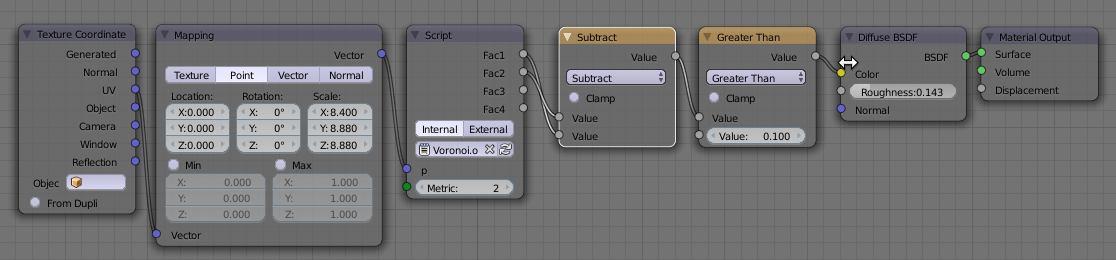
The example below is a Voronoi Crackle textures (basically the distance to the second closest point minus the distance to the closest point):

The node setup for this image is shown below.

Code

The code is quite simple. It utilizes the node_texture.h include distributed with Blender. Its outputs are the distances to the four closests points.
#include "node_texture.h"

shader Crackle(
  point p = P,
  output float Fac1 = 0,
  output float Fac2 = 0,
  output float Fac3 = 0,
  output float Fac4 = 0
){
  float da[4];
  point pa[4];

  voronoi(p, "Distance Squared", 0, da, pa);
  
  Fac1 = da[0];  
  Fac2 = da[1];  
  Fac3 = da[2];  
  Fac4 = da[3];  
}
Mind you, there is a lot more in the include (it is in the scripts\addons\cycles\shader directory of you Blender distribution), it even sports a voronoi_Cr function which does more or less the same as the node setup below, but this node is a bit more versatile for your experimentation :-) The only drawback is that we cannot define anything in the make up of the node ohter than its input and output sockers, so it is not possibly to define a nice drop down with for example distance metrics in OSL. (We could use an integer socket to switch, but that feels clunky).

Example node setup

The image at the start of this post was created with the following node setup: