

Animating a Space Tree Pro tree
The animation is not the best in the world but it does show how easy it is to animate a tree that was generate with my Space Tree Pro add-on.
The steps that were take were simple:
The steps that were take were simple:
- Create a lattice object and move/scale it so it enfolds the tree and its leaves
- Add a lattice modifier to the tree: select the tree and then the lattice, type Ctrl-P, choose lattice
- Add a lattice modifier to the leaf emitter: add modifier, select the same lattice object
- Add a shape key to the lattice and let it deform the objects
- Keyframe the shape key on the lattice
- Optionally: keyframe the rotation on the Leaves particle system
Sunset
I am working on some additional images to promote my new addon Space Tree Pro and although primarily intended for trees in the middle distance you can create hero trees as well. 
The tree was created by distributing a group of icospheres to shape the crown and the rock and the wall are part of an exclusion group, so growing branches did not penetrate them. All branches drop a bit below the volume set by the icospheres because of tropism. The scene looks like this:


The tree was created by distributing a group of icospheres to shape the crown and the rock and the wall are part of an exclusion group, so growing branches did not penetrate them. All branches drop a bit below the volume set by the icospheres because of tropism. The scene looks like this:

Space Tree Pro, a new way to create trees in Blender
I like to announce my new tree creation addon Space Tree Pro that will appear on Blender Market on June 25.
A teaser video is already on YouTube:
The add-on is a natural evolution of my free space tree addon, with a vastly improved user interface, the possibility to influence the shape of the trees with the grease pencil, better tree trunks that are uv-unwrapped and generated faster, and a nice starter set of ready to use trees (that can be used as is, but are even better suited as a starting point for your own trees). Combined with the tutorial videos and a comprehensive manual I hope it will help people create many trees quickly with minimal effort, without sacrificing the individual character of each generated tree and offering great flexibility in blending trees with their environment.
Of course the add-on still has all the features of its free counterpart as well, like the possibility to shape the crown with groups of objects, defines shadow groups and exclusion zones and create trees or hedgerows with multiple trunks. Another new feature is that all configuration parameters are stored with the generated tree, which means you can create libraries of trees in separate .blend files and those trees can be loaded and tweaked again with the add-on.
Check Blender Market soon and I hope you will find the offer worthwhile.
WeightLifter discount
Today my WeightLifter addon, together with lots of other nice offerings, is on discount at BlenderMarket.
They are celebrating their first anniversary and offer 20% off on over a hundred products. It's only for a day (june 10) so grab it before it is too late.
Voronoi playtime, redux
In a previous article I showed how some hidden functionality in Blender's distributed OSL headers could be used to create all sorts of Voronoi/Worley noise. At that point I left out the choice of distance metric because there wasn't a nice way to implement choices in OSL.

The code for the shader is available on GitHub. The node it generates may look a bit different than in the noodle shown here because I added an exponent input
There still isn't but prompted by a question I decided to implement it in an ugly way; after all, if it works that is all that matters :-). All the necessary code to implement different distance metrics is already in node_texture.h but for some reason it was commented out. I therefore lifted the necessary part from this file and combined it with a a small shader that lets you choose the distance metric with an integer. An example for the Manhattan metric is shown below.

Node setup and code availability
The node setup used to generate the image above looks like this: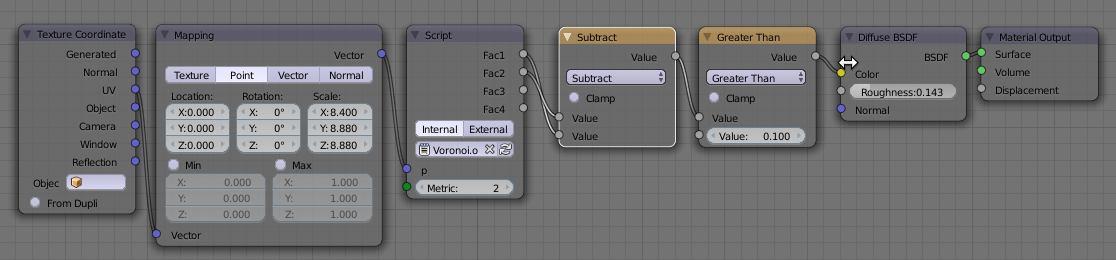
The code for the shader is available on GitHub. The node it generates may look a bit different than in the noodle shown here because I added an exponent input
E that can be used for the generalized Minkovsky metric (metric == 6). If you would like to know more about programming OSL you might be interested in my book "Open Shading Language for Blender". More on the availability of this book and a sample can be found on this page.
Greebles in OSL
The shader that is presented here basically takes as input a set of uv coordinates and produces a set of rectangles, each with their own uv coordinates. These rectangles are randomly distributed and rotated and do not necessarily cover everything: the fac output signals whether there is a rectangle or not.
With this set-up you can for instance cover a surface with random hull plates or similar:

The noodle used to produce the image looks like this:

There are two OSL shaders in this noodle: the first one on the left is called Greebles and is the one that divides up the coordinate space, the second one is called Rivets and is part of the green Rivets material layout. That last one simply distributes small circles around the edges of a rectangle.
Both shaders are available on GitHub, Greebles here, and Rivets here.
With this set-up you can for instance cover a surface with random hull plates or similar:

The noodle used to produce the image looks like this:

There are two OSL shaders in this noodle: the first one on the left is called Greebles and is the one that divides up the coordinate space, the second one is called Rivets and is part of the green Rivets material layout. That last one simply distributes small circles around the edges of a rectangle.
Both shaders are available on GitHub, Greebles here, and Rivets here.
If you would like to know more about programming OSL you might be interested in my book "Open Shading Language for Blender". More on the availability of this book and a sample can be found on this page.
Subscribe to:
Posts (Atom)